Address 304 North Cardinal St. Dorchester Center, MA 02124
Work Hours Monday to Friday: 7AM - 7PM Weekend: 10AM - 5PM
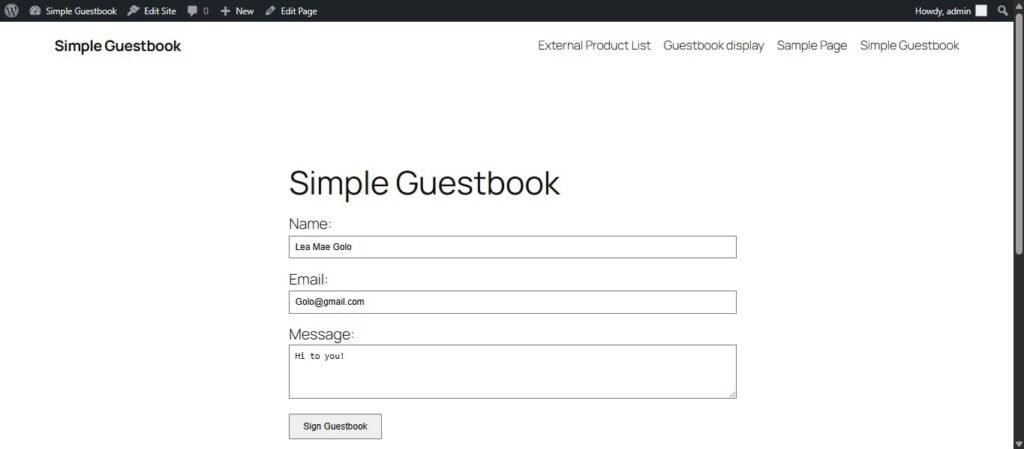
Frontend (User View): The Submission Form
The guestbook form allows any visitor to submit their name, email, and a message, providing a public feedback or contact mechanism.
Frontend Requirement: Screenshot of the live Guestbook form.
Observation: The form is integrated into a WordPress page titled “Simple Guestbook.” It includes standard fields for Name, Email, and a larger text area for the Message. A “Sign Guestbook” button is visible, indicating readiness for user interaction. This demonstrates the successful deployment of the plugin’s public interface.
Backend (Admin View): Displaying Entries
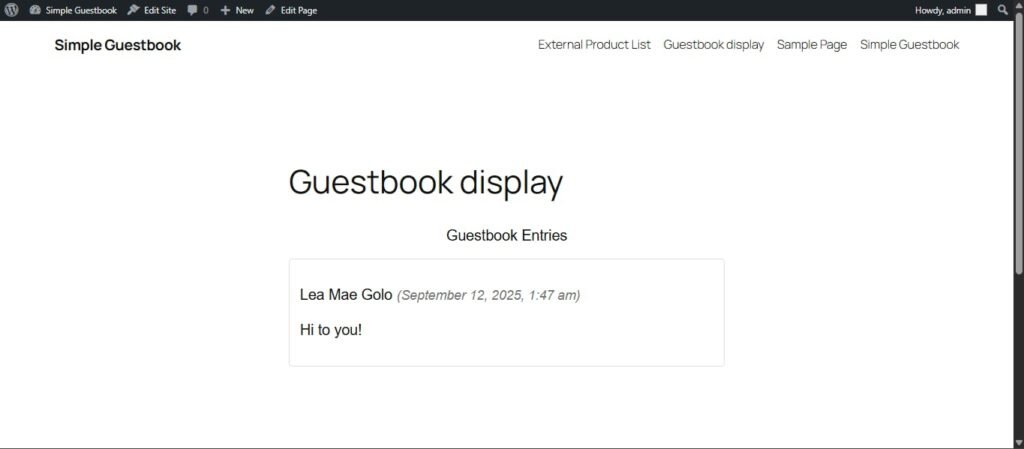
The second crucial part of the activity was confirming that the submitted data is correctly captured and displayed for site administrators and, in this case, publicly.
Backend Requirement: Screenshot of the backend settings (specifically the display of the functioning feature).
Observation: This page, titled “Guestbook display,” confirms that the entry submitted through the frontend is successfully captured and displayed. The entry includes the name (Lea Mae Golo), the date and time of submission, and the content (“Hi to you!”). The public display of entries confirms the “Read” function of the guestbook data management is working. While not the settings page itself, this shows the direct functional result of the backend configuration.
What I Learned
Configuring the Simple Guestbook plugin reinforced several key concepts related to WordPress CMS:
Plugin Installation and Shortcodes: I learned how to install a functional plugin and, critically, how to use plugin-specific shortcodes (e.g., [guestbook_form]) to embed complex functionality directly into standard WordPress pages.
Data Flow and Persistence: The exercise demonstrated the entire cycle of user-generated data: a user submits data on the frontend; the data is securely written to the WordPress database on the backend; and the system then retrieves and displays that persistent data on the display page.
Bridging Frontend and Backend: This activity was a practical example of how WordPress plugins serve as the link between the user experience (filling a form) and the administrative duties (viewing and managing submissions).